
Had to whip this up for a colleague. Turns out I was already doing this in one of my runbooks but had forgotten. Now that I rediscovered it, time to put it here for future reference.
This PowerShell code will go through all your connectors (except the outgoing one), make a list of forests and the included and excluded OUs and put them into a variable called $OUs. Then it will put this into a CSV file imaginatively called blah.csv.
|
1 2 3 4 5 6 7 8 9 10 11 12 13 |
$OUs = foreach ($object in Get-ADSyncConnector | Where-Object {$_.Name -notmatch ' - aad'}) { @{ "Forest" = $object.Partitions.Name "Include" = $object.Partitions.ConnectorPartitionScope.ContainerInclusionList "Exclude" = $object.Partitions.ConnectorPartitionScope.ContainerExclusionList } } $OUs | ForEach-Object { [PSCustomObject]$_ | Select-Object Forest,@{Name="Include";Expression={ $_.Include | Sort-Object | Out-String }},@{Name="Exclude";Expression={ $_.Exclude | Sort-Object | Out-String }} | Export-Csv blah.csv -Append -NoTypeInformation } |
Key thing is Out-String, which is the bit I had forgotten about. This little gem converts input objects to strings… which also means if you send it an array (which is what the Include and Exclude keys above in $OUs are) it combines them into a single string (with the individual elements on separate lines).
If I don’t do that, and instead use a variant like this:
|
1 2 3 4 5 |
$OUs | ForEach-Object { [PSCustomObject]$_ | Select-Object Forest,Include,Exclude | Export-Csv blah2.csv -Append -NoTypeInformation } |
The result looks like this:
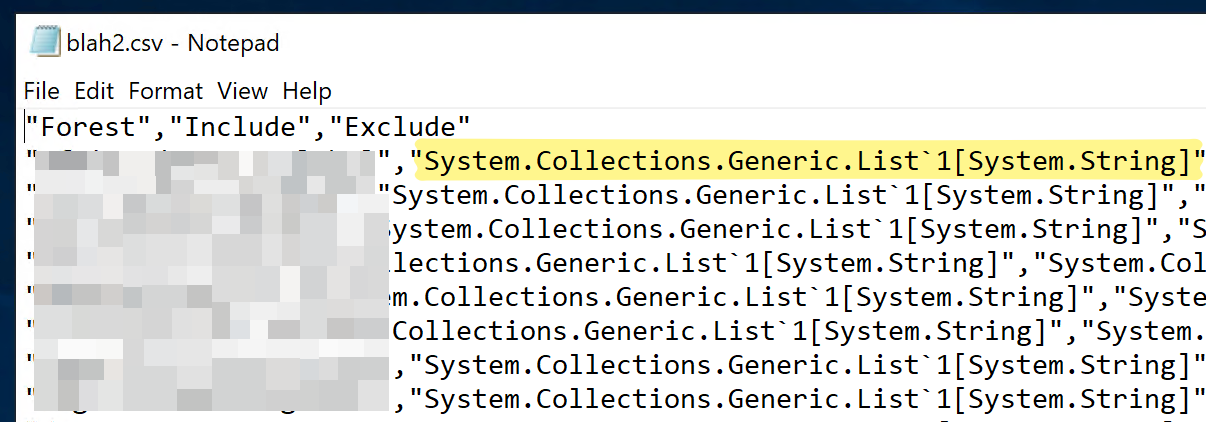
Not helpful.
That’s because the type of Include and Exclude is that:
Pipe that to Out-String though, and what I get is a single string.
Anyhoo, after running the first PowerShell code, open the CSV file in Excel, select all, turn on word wrap, and you get a CSV file with all the OUs. No point putting a screenshot of that here coz I’ll just have to blur everything. 😃