
Continuing my trilogy (here and here) of Hue API posts… in my previous post I detailed how I set the lights to turn or or off when I login to my Mac.
Slight issue with that. When I used to do this via the Hue sensor, it would set the correct scene coz the sensor was set to power on the light with a particular scene. Now when I turn it on directly, it just turns on to whatever scene was last set and not a specific one I want.
Figuring out how to do this was a bit more work. Lights don’t seem to have scenes associated with them, but there is a scene API so I started from there.
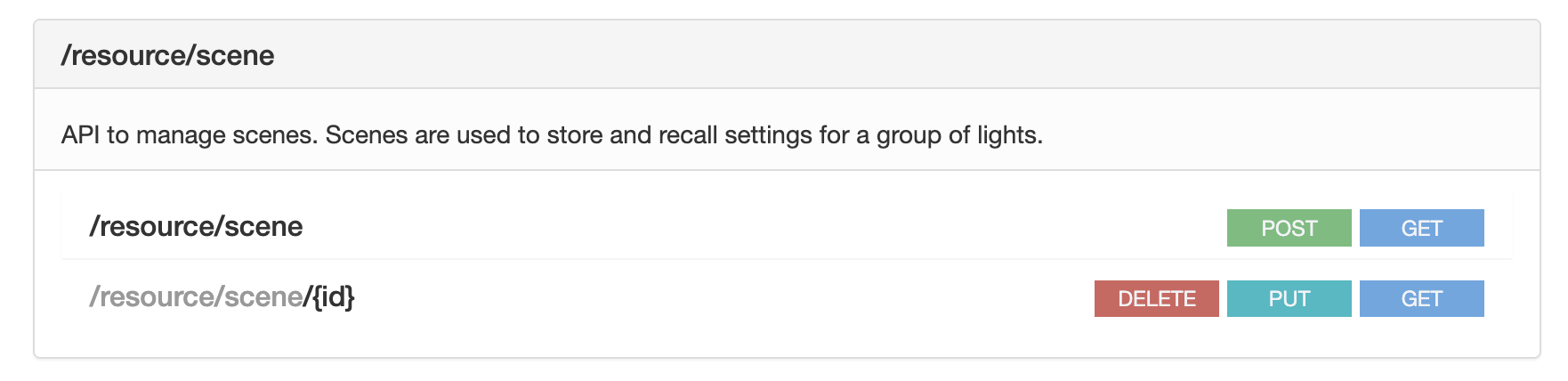
To get a list of all my scenes:
|
1 2 3 4 5 |
curl --request GET \ --url https://$BRIDGE_IP/clip/v2/resource/scene \ --header "content-type: application/json" \ --header "hue-application-key: $APIKEY" \ --insecure |
The output of that looks like this:
|
1 2 3 4 5 6 7 8 9 10 11 12 13 14 15 16 17 18 19 20 21 22 23 24 25 26 27 28 29 30 31 32 33 34 35 36 37 38 39 40 41 42 43 44 45 46 47 48 49 50 51 52 53 54 |
{ "errors": [], "data": [ { "id": "00d34266-51d6-4c80-83fa-bf0ab36e5c3c", "id_v1": "/scenes/tLsH7eKgC2MbSukJ", "actions": [ { "target": { "rid": "a9871b12-441e-44ba-8554-e458d6c9f65c", "rtype": "light" }, "action": { "on": { "on": true }, ... } }, { "target": { "rid": "4f904f94-7997-4e41-ac43-0635a07472c4", "rtype": "light" }, ... } ], "recall": {}, "metadata": { "name": "First light", "image": { "rid": "ec790a2f-e63e-46cf-8a0f-1dd525e70f66", "rtype": "public_image" } }, "group": { "rid": "baddd0aa-d3cd-4e13-8ddd-627d131f8b18", "rtype": "room" }, "speed": 0.626984126984127, "auto_dynamic": false, "status": { "active": "inactive", "last_recall": "2025-03-10T17:40:45.090Z" }, "type": "scene" }, { "id": "06ab863f-f991-4659-af62-c9b6d4037d48", "id_v1": "/scenes/63HZDqdb-RJ0TTGH", .... } ] } |
The scene name can be found in the metadata > name property. What I learnt from some fooling around is that each of these scenes has a rid property which is the room id the scene is associated with. (And the lights themselves are in rooms have so have a rid associated with them, and that’s how you link a scene to a light).
I had some fun with jq. It’s been a while, and while I usually use PowerShell and never had to fuss too much with extracting data from JSON, this was a good excuse to stick with Bash and jq.
I piped the output of the above command into jq like this:
|
1 2 3 4 5 6 |
curl --request GET \ --url https://$BRIDGE_IP/clip/v2/resource/scene \ --header "content-type: application/json" \ --header "hue-application-key: $APIKEY" \ --insecure | jq '.data | .[] | { scene: .metadata.name, rid: .group.rid, id: .id }' |
The output is a list of scenes and room ids and scene ids.
|
1 2 3 4 5 6 7 8 9 10 |
{ "scene": "Rolling hills", "rid": "baddd0aa-d3cd-4e13-8ddd-627d131f8b18", "id": "fdae49d6-cd84-4b00-9f30-b90e65d3bb13" } { "scene": "Night-time", "rid": "baddd0aa-d3cd-4e13-8ddd-627d131f8b18", "id": "ffbfe1af-8868-4b39-944b-519763636032" } |
Next I went through the lights I wanted to modify, and found their room Ids.
|
1 2 3 4 5 6 7 8 |
ALLLIGHTS=(<guid> <guid>) for LIGHT_ID in ${ALLLIGHTS[@]}; do curl --request GET \ --url https://$BRIDGE_IP/clip/v2/resource/grouped_light/$LIGHT_ID \ --header "content-type: application/json" \ --header "hue-application-key: $APIKEY" \ --insecure done | jq '.data | .[] | .owner.rid' |
At this point I could have just dumped the output of the first command that gives scenes and room ids and ids, and searched for the room ids of my lights. But I wanted to keep things interesting, so I took one of the room Ids and decided to search all scenes for that room id.
|
1 2 3 4 5 6 |
curl --request GET \ --url https://$BRIDGE_IP/clip/v2/resource/scene \ --header "content-type: application/json" \ --header "hue-application-key: $APIKEY" \ --insecure | jq '.data | .[] | select(.metadata.name == "<the scene I am interested in>" and .group.rid == "<room id from before>") | .id' |
This will return a single id, that of the scene.
Later I realized I have two set of lights in two set of rooms, so I modifed the above to search for both rooms. (Both rooms had the same scene name, so that’s why I don’t search for multiple names).
|
1 2 3 4 5 6 |
curl --request GET \ --url https://$BRIDGE_IP/clip/v2/resource/scene \ --header "content-type: application/json" \ --header "hue-application-key: $APIKEY" \ --insecure | jq '.data | .[] | select(.metadata.name == "<scene name>" and (.group.rid == "<room id 1>" or .group.rid == "<room id 2>")) | .id' |
Now I have the two scene Ids I am interested in. Time to see if I can turn on the lights with these ids. Each scene Id is for a particular light. (Disclaimer: my situation might be a bit different from anyone else reading this. I have a set of lights that I put into separate “fake” rooms in Hue, so that’s why I am fussing about with rooms. I do this just so I can turn on the bedroom “room” lights without turning on the lights on my desk etc. too even though they are all in the bedroom).
The instructions on turning on a scene aren’t very clear in the API docs. All they have is the following which you send via a PUT request:
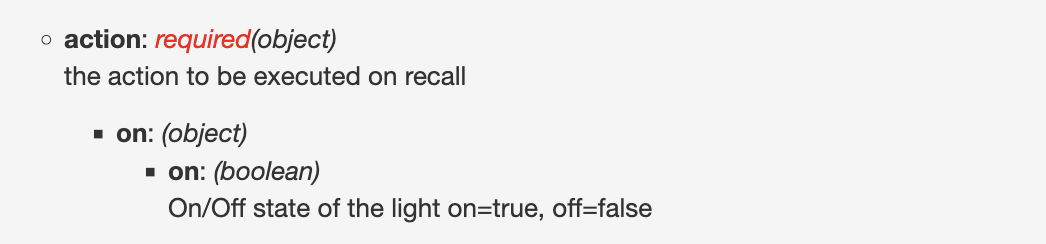
So first I tried this:
|
1 2 3 4 5 6 7 8 9 |
ALLSCENES=(<guid1> <guid2>) for SCENE_ID in ${ALLSCENES[@]}; do curl --request PUT \ --url https://$BRIDGE_IP/clip/v2/resource/scene/$SCENE_ID \ --header "content-type: application/json" \ --header "hue-application-key: $APIKEY" \ --data '{ "recall": {"action": "on"} }' \ --insecure done |
Didn’t work! I got an error:
|
1 2 3 |
{"data":[],"errors":[{"description":"error: 'json-schema validation', keyword: 'enum', details: {instanceRef: '#/recall/action', schemaRef: 'clip-api.schema.json#/definitions/RecallFeaturePut/properties/action'}"}]} {"data":[],"errors":[{"description":"error: 'json-schema validation', keyword: 'enum', details: {instanceRef: '#/recall/action', schemaRef: 'clip-api.schema.json#/definitions/RecallFeaturePut/properties/action'}"}]} |
Then I took a look at the scene JSON again and saw the following:
|
1 2 3 4 5 6 7 8 9 10 11 12 13 14 15 16 17 18 19 20 21 |
... "recall": {}, "metadata": { "name": "<scene name>", "image": { "rid": "<guid>", "rtype": "public_image" } }, "group": { "rid": "<guid>", "rtype": "room" }, "speed": 0.603, "auto_dynamic": false, "status": { "active": "inactive", "last_recall": "2025-05-19T11:57:57.032Z" }, "type": "scene" ... |
Hmm, last status is inactive. So I changed my code to do active, instead of on.
|
1 2 3 4 5 6 7 8 9 |
ALLSCENES=(<guid1> <guid2>) for SCENE_ID in ${ALLSCENES[@]}; do curl --request PUT \ --url https://$BRIDGE_IP/clip/v2/resource/scene/$SCENE_ID \ --header "content-type: application/json" \ --header "hue-application-key: $APIKEY" \ --data '{ "recall": {"action": "active"} }' \ --insecure done |
Boom! That worked. 😎
Interestingly, you’d think that sending the action as inactive instead of active will turn it off, but that didn’t do anything. I got an error again:
|
1 2 3 |
{"data":[],"errors":[{"description":"error: 'json-schema validation', keyword: 'enum', details: {instanceRef: '#/recall/action', schemaRef: 'clip-api.schema.json#/definitions/RecallFeaturePut/properties/action'}"}]} {"data":[],"errors":[{"description":"error: 'json-schema validation', keyword: 'enum', details: {instanceRef: '#/recall/action', schemaRef: 'clip-api.schema.json#/definitions/RecallFeaturePut/properties/action'}"}]} |
Which is fine, I guess. What you want to do is turn off the lights anyway.
Here’s an updated version of my script that turns on or off the lights:
|
1 2 3 4 5 6 7 8 9 10 11 12 13 14 15 16 17 18 19 20 21 22 23 24 25 26 27 28 29 30 31 32 |
#!/usr/bin/env bash APIKEY="<apikey>" BRIDGE_IP="<ip address>" SENSOR_ID="<sensor guid>" ALLLIGHTS=(<light guid> <light guid>) ALLSCENES=(<scene guid> <scene guid>) if [[ $1 == "enable" || $1 == "on" ]]; then echo "Enabling lights" for SCENE_ID in ${ALLSCENES[@]}; do curl --request PUT \ --url https://$BRIDGE_IP/clip/v2/resource/scene/$SCENE_ID \ --header "content-type: application/json" \ --header "hue-application-key: $APIKEY" \ --data '{ "recall": {"action": "active"} }' \ --insecure done else echo "Disabling lights" for LIGHT_ID in ${ALLLIGHTS[@]}; do curl --request PUT \ --url https://$BRIDGE_IP/clip/v2/resource/grouped_light/$LIGHT_ID \ --header "content-type: application/json" \ --header "hue-application-key: $APIKEY" \ --data '{ "on": { "on" : false } }' \ --insecure done fi |
And that’s all folks! 🤓
Update (7th Nov 2025): I noticed that whenever I’d lock the screen Hammerspoon wouldn’t always run the script to turn off lights. It could be a time issue I suppose, coz reloading Hammerspoon and then locking the screen does. turn off lights. I am not entirely convinced it’s a time issue coz if I leave the system as is overnight and then login the next day, the script to turn on lights runs.
Maybe I am spending more working than I don’t? 🤓
Anyways, slight hack to fix the issue. I added the following to my config:
|
1 2 3 4 |
hs.hotkey.bind({ "ctrl", "cmd" }, "q", function() hs.execute("~/desklights.sh disable", false) hs.caffeinate.lockScreen() end) |
This causes Hammerspoon to bind to the keys I use for locking the screen, execute the script and then proceed to lock the screen. It’s not ideal coz it doesn’t capture the scenario where I step away for a while without locking the screen and the system goes to sleep and the script doesn’t run.